

“The Wi-Fi is there… but nothing works.”
If you work in Wi-Fi, you’ve heard this more times than you can count. And every time, it sounds simple. But it almost never is. Because Wi-Fi issues aren’t just about signal they’re about experience, perception, and everything that happens between seeing a network and actually using it.
It always starts with a complaint. Users don’t speak in RSSI, roaming events, or DHCP failures. They say things like “there’s no internet,” “it’s slow,” or “I can’t connect.” And sometimes, they’ll say something bigger: “everyone here has Wi-Fi issues.” That’s where things get interesting.
One user runs into a problem and casually asks a colleague if they’ve seen the same thing. The colleague replies, “yeah… sometimes.” And just like that, a single issue becomes a department-wide problem. But when you look closer, those experiences are often completely unrelated different devices, different moments, different locations. As engineers, we have to separate perception from reality and ask yourself a better question: is there actually a shared failure point?
Then there’s the classic: “there’s no internet.” That statement alone doesn’t tell you much. What matters is what happened just before. I’ve seen cases where a user was working perfectly fine on a wired connection, unplugged their laptop, walked through a concrete stairwell, sat down in a meeting room, opened their device… and suddenly nothing worked. From their perspective, the Wi-Fi failed. But technically, the issue happened during the transition the device didn’t properly reassociate, or it carried stale state from the wired connection. The problem wasn’t the internet. It was the journey.
And sometimes that journey gets bigger. Think about moving between buildings. A user walks from Building A, crosses a courtyard with no coverage, and enters Building B. On paper, both buildings have great Wi-Fi. But there’s no transition zone in between, and to make it more complex, each building sits behind a different controller. So instead of roaming, the client disconnects completely and has to start over. That’s not a smooth handover that’s a harsh break followed by full reassociation. To the user, it just feels like Wi-Fi stopped working.
Other times, the opposite happens. Instead of disconnecting too early, the device holds on for too long. These are sticky clients devices that refuse to leave an access point even when a much better one is nearby. You walk into a meeting room with excellent coverage, but your device is still clinging to the AP down the hallway. Signal drops, performance suffers, and again the conclusion is the same: “Wi-Fi is slow.” But the issue isn’t coverage it’s client behavior and airtime efficiency.
Then there are situations that look perfect on the controller but fail underneath. I’ve seen a case where, from remote troubleshooting, it was unclear whether the SSIDs were broadcasting maybe a broken AP? The AP was in the same room, yet users couldn’t connect at all. When they walked into another room with a different AP, they connected immediately. The issue turned out to be a configuration mismatch. The access point had been moved on purpose between controllers, but the policy and site tags were wrongfully copied and applied by the controller. So the AP had joined the controller and appeared operational, but the underlying mapping VLANs and policies was broken. Even the logs hinted at it, showing DTLS session conflicts. The fix was : reset the tags, let the AP return to default, and then reapply the correct configuration.
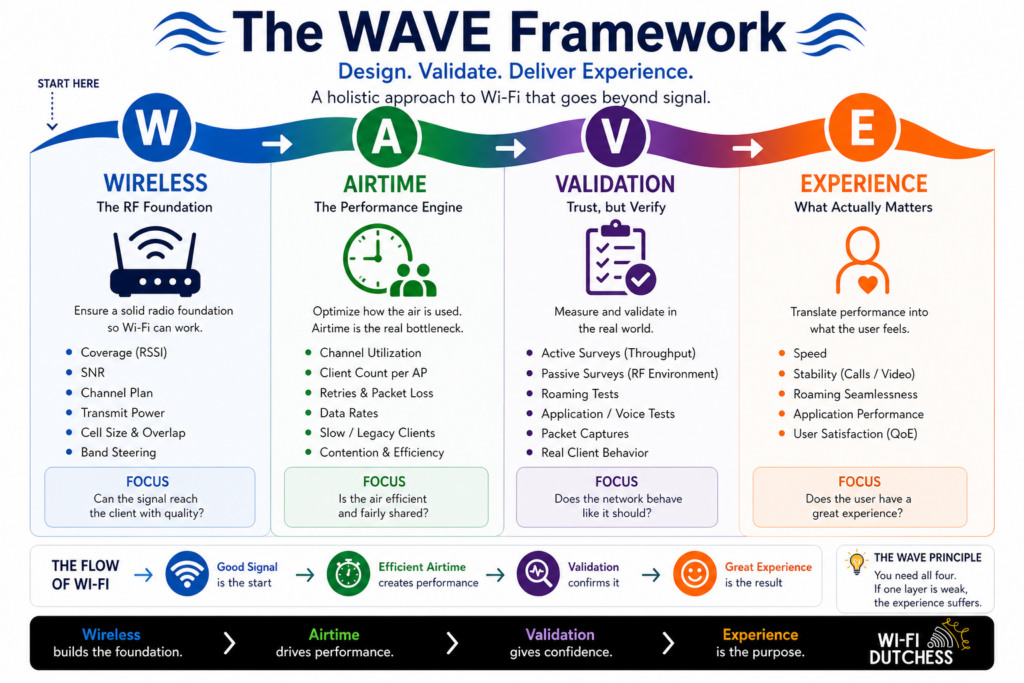
This is why it made me think off the WAVE framework because it forces you to look beyond just “is there signal?” Wi-Fi isn’t just about signal strength, and focusing only on that is where troubleshooting often goes off track. You can have perfect RF conditions and still deliver a poor user experience, because Wi-Fi is a system, not just signal. And if you design your networks this way, the outcome is great Wi-Fi.
Wireless is your foundation — coverage, SNR, and channel planning.
Airtime is where performance lives — how efficiently the medium is shared.
Validation is your reality check — real-world testing instead of just dashboards.
Experience is the outcome — the only thing users actually care about.
You can get the first three right and still fail the last one if you don’t connect them together. Because in the end, users don’t think in RSSI they think in experience. Do calls stay smooth? Do apps load instantly? Does everything just work?
That’s Quality of Experience.
And that’s why the real question isn’t:
“Is the signal good?”
but:
“Is the experience good?”
Because good signal is the start. Great experience is the result.
When you step back, a pattern starts to appear. These problems aren’t random: they live in the gaps. Between wired and wireless. Between buildings. Between access points. Between controllers. And even between what users say and what’s actually happening.
That’s why translating user complaints into engineering problems is such a critical skill.
Better troubleshooting starts with better questions: not more technical ones, but more contextual ones. You’re not just trying to fix Wi-Fi, you’re trying to understand the story behind the issue.
Start with the moment it broke. What were they doing when it stopped working? Did it work before in that same spot? Did it recover on its own, or did they have to reconnect? That gives you a timeline instead of a guess.
Movement is a big one, and often overlooked. Were they walking or sitting still? Did they come from another location? Did they switch from wired to Wi-Fi? Many issues hide in transitions: roaming, reassociation, or devices holding on to old connections longer than they should.
Location adds another layer. Where exactly did it happen? Everywhere, or just specific spots? If possible, walk the path with them. Patterns in space often reveal what dashboards don’t.
Then clarify what “not working” actually means. Are they connected but apps don’t load? Is it slow, or completely down? You’re translating experience into stages like association, authentication, IP assignment, or data flow.
It’s also important to challenge the scope of the problem. When someone says “everyone has issues,” dig a bit deeper. Are others experiencing the exact same problem at the same time and place, or are different experiences being grouped together? This helps you separate real widespread issues from coincidental ones.
Finally, don’t forget the device itself. What device are they using? Does it happen on others? Does reconnecting help? Sometimes the problem isn’t the network: it’s the client.
In the end, you’re not really asking “what’s wrong with the Wi-Fi?” You’re asking “what happened in your experience?” When you understand time, location, movement, and behavior, you can translate almost any complaint into something actionable.
Because the real issue is rarely in the sentence: it’s in the story behind it.
Design plays a huge role here too. If you design only for coverage, you’ll run into trouble. You need to think about secondary coverage, so clients have options to roam. You need the right cell sizing, so devices don’t stick too long or compete unnecessarily. You need a clean channel plan. And most importantly, you need to design for how users actually move and capacity: not just how the building looks on a floor plan.
Because strong signal with poor experience still feels broken.
So the next time someone says, “there’s no internet,” don’t just start with the signal. Start with the story. What happened just before it stopped working? Did they move? Did they switch from wired to wireless? Did they pass through a gap?
Users describe what they feel. Engineers explain why it happened. And the real skill is bridging that gap.
Because in Wi-Fi, good signal is just the beginning: understanding the experience is what really matters.
Until next time, keep the experience seamless!