

CWDP 305 Chapter 5 Designing the WLAN
WLAN management solutions fall into four types:
- Controller-based: Centralized management via a controller (hardware or virtual) that simplifies AP setup.
- WNMS-based: Focuses on AP configuration and monitoring without centralized data forwarding.
- Cloud-based: Similar to controller-based but managed through the cloud; data usually stays local, with optional appliances for centralized filtering.
- Autonomous: Each AP is manually configured—ideal for small networks due to simplicity and reliability.
Radio Resource Management (RRM)
Automatically adjusts Wi-Fi channels and transmit power using data from access points to optimize network performance and detect issues such as interference or coverage gaps. Modern access points use Software Defined Radios (SDR), allowing flexible operation across 2.4 GHz and 5 GHz bands to improve capacity and range.
Proper cell sizing and antenna tuning help reduce Co-Channel Interference (CCI), which occurs when devices share the same channel and must take turns transmitting. Adjacent Channel Interference (ACI) happens when overlapping channels interfere with each other, causing retransmissions. In the 2.4 GHz band, channels 1, 6, and 11 are used because they do not overlap, reducing ACI. On the 5 GHz band are typically 25 non-overlapping channels when configured with 20Mhz channel widths. (with channel bonding is used to create wider channel widths, the number of non-overlapping channels decrease. Channel bonding to 40MHz wide reduces the non-overlapping channels to 12.
Channel planning depends on regulatory rules and includes decisions about channel width, reuse patterns, DFS, and transmit power across the 2.4, 5, and 6 GHz bands.
Channel width affects performance:
- 20 MHz is preferred for high-density environments.
- 40 MHz is used in medium-density deployments.
- 80 and 160 MHz provide higher throughput but are less common due to spectrum limitations.
- Wi-Fi 7 supports up to 320 MHz, though practical use is still limited.
Channel reuse patterns help minimize interference
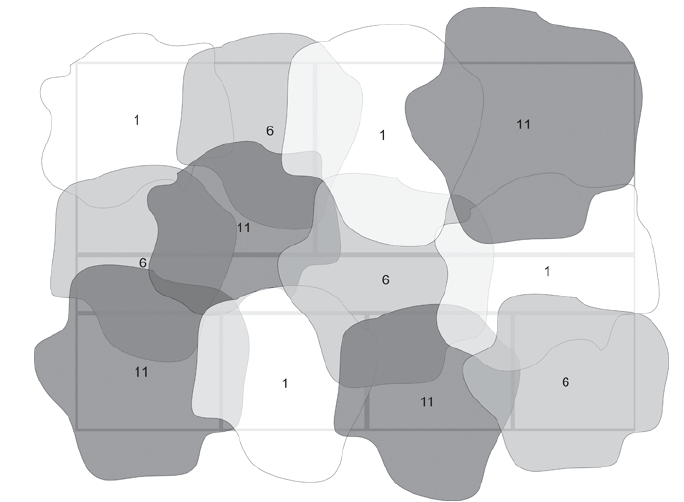
In a 2.4 GHz single-floor deployment, only channels 1, 6, and 11 are used. An AP should choose a channel different from the two strongest neighboring channels to avoid adjacent channel interference (ACI). In dense environments, selecting the channel with the lowest airtime utilization is more effective.
In 5 GHz, a skipped-channel plan (e.g., 36, 44, 52, 60…) helps separate neighboring cells and reduce interference. 6 GHz follows the same principle but offers more spectrum, allowing wider channels like 40 MHz. Transmit power must also be controlled to prevent excessive co-channel interference (CCI).
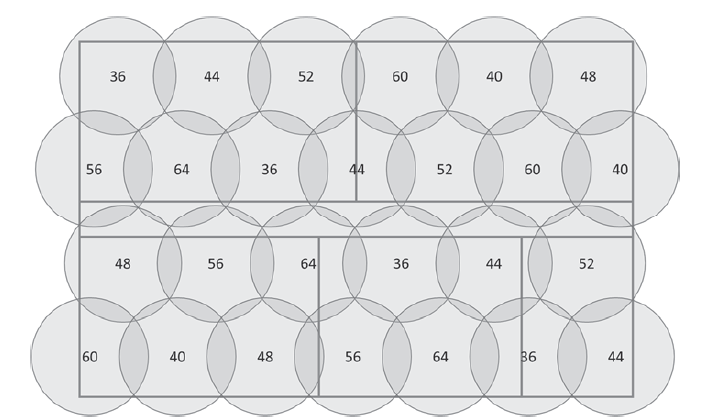
Technologies like BSS Coloring (802.11ax) help devices distinguish between overlapping networks, improving efficiency. Features like 80+80 MHz channel bonding and enhanced RTS/CTS allow flexible spectrum use, though they are rarely used in enterprise 5 GHz networks due to spectrum constraints.
Channels in 6E
In Europe, only a portion of the 6 GHz frequency space has been approved, while other countries and the United States have opened up 1200 MHz of frequency space. In addition to four new UNI bands, bands five through eight, there is now a massive number of channels available. With this number of channels, the use of 80 MHz bands is possible without encountering problems.
The 6 GHz band is particularly useful in high-density environments like sports arenas, where you are often forced to use 20 MHz channels. The use of 6 GHz is ideal for designing Wi-Fi networks with the capacity to handle large numbers of users without latency issues.
Infrastructure Services
WLANs depend on infrastructure services like DHCP, DNS, NTP, and firewalls, which must be properly designed and configured to support reliable WLAN operation.
- DHCP provides IP configuration such as IP addresses, gateways, DNS, lease times, and options. In WLAN design, engineers must plan DHCP scopes, options, and lease durations, often using separate subnets/VLANs for wireless clients and shorter leases for guest networks. DHCP Option 43 can be used to help APs locate the WLAN controller automatically. Sometimes when the complain is that the Wi-Fi is not working it may be a DHCP issue.
- DNS resolves domain names to IP addresses and supports WLAN operations such as controller discovery when DHCP Option 43 is not used. It is also important for cloud-based WLAN management. Additionally, DNS can support captive portals by redirecting users to authentication pages and can be used in DNS-based ACLs to restrict or allow access to specific websites, creating a walled-garden environment.
- NTP synchronizes device time using a network time server, ensuring accurate logging and system operations on WLAN controllers and access points.
- Firewalls may need configuration to support WLAN communication, especially between APs and controllers. They must allow protocols such as LWAPP (UDP 12222, 12223) or CAPWAP (UDP 5246, 5247). Additional TCP/UDP ports may also need to be permitted depending on vendor requirements.
- Several infrastructure components support WLAN security and management:
- ACLs: Control which traffic can pass through routers and must allow required WLAN communication ports.
- VLANs: Segment network traffic, commonly separating wireless from wired networks or enterprise from guest WLANs.
- RADIUS & LDAP: RADIUS handles authentication, often using LDAP to access directory services like Active Directory.
- PKI: Provides digital certificates required by many EAP authentication methods.
- RBAC: Grants network permissions based on user roles or groups rather than individual settings.
- BYOD & MDM: MDM solutions manage and secure mobile devices, enabling device onboarding, policy enforcement, and integration with NAC.
Selecting Access Points
The first step in selecting an Access Point (AP) is deciding where it will be mounted. Indoor locations use indoor APs, which usually have plastic covers with metal backing, while outdoor or weather-exposed locations require rugged outdoor APs with metal or reinforced plastic enclosures.
Another important decision is the antenna type. Indoor APs typically use internal omni-directional antennas, though internal directional antennas are increasingly used to create targeted Wi-Fi coverage areas. Outdoor APs often use external high-gain omni or directional antennas designed to withstand weather conditions. Integrated outdoor APs are also used in harsh environments such as greenhouses.
Performance also depends on the number of antennas and radio capabilities. APs with multiple antennas and MIMO perform better than single-antenna SISO APs and support features such as Maximal Ratio Combining (MRC) and Transmit Beamforming (TxBF).
Adding antennas increases theoretical signal gain:
- 2 antennas ≈ 3 dB gain
- 3 antennas ≈ 5 dB gain
- 4 antennas ≈ 6 dB gain
In practice, MRC gains are closer to theoretical values than TxBF gains, though improvements may increase as 802.11ac networks become more common.
Powersource
Access Points (APs) can be powered either through a wall outlet or Power over Ethernet (PoE), where power and data are delivered through the same Ethernet cable.
PoE standards include:
- 802.3af: up to 15.4 W at the power source and about 12.95 W at the device
- 802.3at: up to 30 W at the source and 25.5 W at the device
- 802.3bt (2018): supports 45–90 W, needed for modern APs with multiple radios (e.g., 2.4, 5, and 6 GHz, plus IoT radios).
- PoE power can be delivered by:
Endpoint PSE: PoE-capable switches
Midspan PSE: PoE injectors placed between the switch and AP
When designing WLANs, the PoE power budget must be considered. A switch may have many PoE ports but limited total power (e.g., 300 W), meaning only a certain number of high-power devices can be supported at the same time.
After selecting APs, they should be staged before installation. Staging defines how APs will be configured, including baseline settings, required firmware, LAN connection during setup, and whether SNMP will be enabled. APs must also be securely mounted using proper mounting options (e.g., ceiling or pole mounts). Fixed placement is important because movement can change wireless coverage
Band steering encourages dual-band clients to connect to 5 GHz instead of 2.4 GHz, where more channels and higher capacity are available.
APs detect dual-band clients by the same MAC address on both radios. They steer clients by delaying or ignoring 2.4 GHz responses (passive) or sending 802.11v BSS Transition requests (active). Steering attempts are limited, and some clients may not respond well, so fallback to 2.4 GHz may occur.
Using WLAN Design Software
In Chapter 5 of CWDP-305 by T. Carpenter et al. (2024), four independent, non-AP vendor-specific tools are discussed that can be used to design a WLAN.
- TamoSoft TamoGraph Site Survey
- Ekahau Site Survey Pro
- AirMagnet Survey Pro
- iBwave Wi‐Fi
I’ve worked with AirMagnet using separate dongles and a rugged tablet, which was quite heavy. Currently, I enjoy using Ekahau Sidekick 2 with an iPad Pro, which is much more portable. I also find Hamina Wireless to be a great online design tool, especially paired with the lightweight Hamina Onsite and Oscium Nomad.
And of course finally documentation includes the Bill of Materials (BoM) which must be more detailed and include AP models and possibly pricing information.
A site survey report documents the findings from an actual survey of the target area, unlike a design report, which outlines planned network implementation. It usually includes heatmaps, lists of detected devices, and other relevant data collected during the survey. Nowadays, tools like Ekahau can automatically generate reports with customizable tags. And no.. it’s not just about showing a green “perfect” floorplan. These reports provide detailed insights, highlighting defined areas and displaying real-world results.
The design report can be generated from the same software as the site survey report, but it’s based on your planned design rather than actual survey data. After installation, a post-validation survey generates a survey report, which should closely match the design report if the pre-design survey was accurate.
The installation guide provides technicians with detailed instructions, including network configuration, precise AP mounting and settings, cables and PoE requirements, antenna orientation, and required tools or equipment.
Until next time, keep the signal strong!
Source(s):
Carpenter, T., et al. (2024). CWDP-305: Certified Wireless Design Professional Study Guide (1st ed.). Durham NC, USA: Certitrek Publishing